Sebenernya cuma iseng2 doang buat ngepost ini... tapi dari pada kaga ada kerjaan sama sekali terus bingung mau ngepost apa'an ya udh deh jadi ngepost "Channel Youtube Punya Gw"... Moga aja pada suka ^_^
kali ini saya akan berbagi cara mengupdate android gingerbread 2.3.6 di hp galaxy y kalian menjadi android jelly blast 4.1.1 .....
"WARNING !!! SayaTIDAK bertanggung jawabapabila terjadi masalah. Namun ROM ini sudah saya coba danberhasil 100%. Setelah menginstall, booting pertama agak lama sekitar 2-5 menit dan itu adalah NORMALnamun apabila sudah ditunggu lebih dari 30 menit maka itu adalah BOOTLOOPdimana kalian harus masukwipe data factory resetlewat CWM Recovery, restore ROM sebelumnyaatau Flash Firmwarelewat Odin atau Kies "
Berikut ini adalah beberapa fitur dari Android Jelly Blast 4.1.1:
NEW COOL FEATURES:
>Based on DDLF1. >Totally Dark Jelly Bean themed. >Each and every icon fine tuned to look like Jelly Bean. >A new Jelly Bean task manager ( Recent apps list). >Added Swipe to clear notifications on Status Bar. >A new, AWESOME JELLYBEAN status bar and notification panel. >New music app based on stock Touchwiz, but contains DSP equalizer support. >NEW LOCKSCREENS- Never miss a chance to show off your cool lockscreen. >OTA FEATURE added. Now users can automatically update the ROM from OTA upgrades, in the settings menu. >A TOTALLY REVAMPED SETTINGS MENU ,With the following new controls : Statusbar Control, Lockscreen Control, Sound Effect Control, and Quick Toggles Control...finally, your phone is truly yours! >New Jelly Bean Digital Clock, analogue clock, and Jelly Bean Search Bar. >New smarter JellyBean keyboard. Extented power menu: Now those long processes are long no more! >Zero delay root access...try and see! >NEW KURO KERNEL, be it more power for gaming, or power saving mode for >Deep Sleep, Kuro kernel takes care of your batteries in the best possible way. >Battery life megaboosted, last upto 2 days in power saving mode! >CPU control feature added....high performance or underclock...choice is yours! >Kernel is suitable for everyone: default settings (conservative + sio ) is battery saving, while bcm + cfq settings give power boost: Antutu score 1957 without any extra tweaks! >Improved memory management. >Two awesome launcher choices: You get both HOLO LAUNCHER, and the STOCK Touchwiz launcher, which is Jelly Bean themed. >Full Screen Caller Mode: Now see your friends in FULLSCREEN while calling them. >SONY BRAVIA ENGINE added...your pictures are clearer than before!! >MULTILANGUAGE: Cestina , Dansk, German, Dutch, English ( US, UK) , Spanish, Estonian, French, Gaeliege, Hravatski, Islenska, Italiano, Kazakh, Latviesu, Lietuviu, Macedonian, Magyar, Nederlands, Norsk, Polski, Portuguese, Ronan , Slovencina, Srpski, Suomi, Svenska, Turkish, Thai, Greek, Chinese, Russian, Hebrew. >Net speed tweaks: Increase your net speed. >Superfast Chrome browser included. >New superb bootanimation. >Enjoy!!!!
JELLYBLAST CORE TOOLS:
>bacem_tweak: This feature adds undervolt support to your phone. The default value of undervolt is -20mV, but you can undervolt it to -100mV. >droidwall_modules: A feature like Windows firewall, protects your phone! >darky_zipalign: This auto zipalign happens at every boot, and optimizes files. >KURO 1 and KURO 2 tweaks: Includes a host of features like: # perfect mount # sdcard speed bost to 2048 # kernel kick ( KAK) # OOM # network boost # auto cache cleaner # minfree # i/o related tweak # vacuum
# 3g mod # battery mod n media # performance ( remove by flushing and purging) # Disable debugging notify icon on statusbar # Disable blackscreen issue after a call # Phone will not wake up from hitting the volume rocker # Enable display Dithering # For SD storage insert notificationsound # journalism disabler
JELLYBLAST ADVANCED FEATURES:
>Audio Enhancements:
i. BEATS™ audio for Marvellous, crisp sound. ( remember to exclude it from your task killer) ii. SONY XLOUD™ enhancement for controlling sound distortion in high sound levels. iii. SRS WOW® HD. iv. Dolby Digital 3D surround sound.
>SONY CYBERSHOT™ Camera enhancements: Clearer image even after zoom and larger image size ( 100%). Adapted from Cybershot mod by Rizal Lovins.
Over The Air - OTA UPDATES (check under settings/OTA updater):
This wil update your ROM to the latest version. Keep yourself updated! (Those who are on PERMANENT CWM, flash the OTA update from sdcard/OTAUpdater/Downloads. For others, the OTA will be flashed automatically.)
1. Refined and polished status bar: Roboto clock Fixed overlapping of Settings button and clear button. Original JellyBean signal icons. Improved swipe to clear. 2. Contacts app has hd contact image support. 3. Golden Play music icon and themed music background. 4. More polished and beautiful framework. Added back the original jellybean battery icon. 5. Gallery with lockscreen wallpaper support.(Those who want back the original ICS Gallery can download it under Troubleshooting below...) 6. An awesome messaging app: Fixed white on white text bug. No auto sms to mms conversion. Theme support. Added original ICS emoticons. 7.Built in ADBLOCKER. 8.Improved phone app.
Facing status bar fc after OTA 2? Go to Status bar mods and remove all mods you might have done, like enabling custom font, hiding clock etc. Reboot. NOW install OTA 2.
Make sure that after installing this rom the version will be 3.0.0...all the users are requested to update to the new rom version by connecting your device to net and click OTA Updater in the app menu...the latest update is of size about 11 MB...after that new rom will be updated & fixes all bug issue...
i. BEATS™ audio for Marvellous, crisp sound. ( remember to exclude it from your task killer) ii. SONY XLOUD™ enhancement for controlling sound distortion in high sound levels. iii. SRS WOW® HD. iv. Dolby Digital 3D surround sound.
2. SONY CYBERSHOT™ Camera enhancements: Clearer image even after zoom and larger image size ( 100%). Adapted from Cybershot mod by Rizal Lovins. 3. Real JellyBean version image. ( Check by multiple clicking the Android Version number under Settings/About phone. 4. New wallpapers from CM10, GS3 and JellyBean. ( Thanks to Hmhadi98). 5. New GS3 lockscreen font and animation. 6. New AOKP inspired Status Bar toggles. 7. New bootanimation by Emanula, fixed by Alan. 8. New System App installer, this can be used to install apps directly to System. Useful when you want to replace System apps. 9. New ICS on-off buttons in Settings and framework. 10. Better RAM usage. 11. Fixed alarm bug. 12. Latest Jellybean Youtube and PlayStore. 13. Improved MMS app. 14. Improved Dialer app.
NOTE:Make Sure that Before Flashing OTA 4 Update Make Sure to have OTA 1,OTA 2 & OTA 3 Flashed!!!
Pada kondisi off, Masuk Ke recovery mode dengan cara menekan tiga tomnol yakni home, power on off, dan volume up
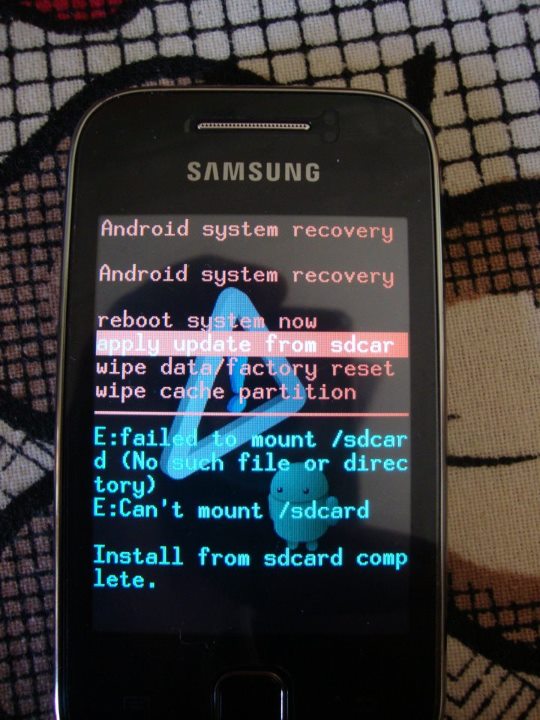
Maka anda akan masuk Ke Recovery Mode dimana anda tidak bisa menggunakan touchscreen namun hanya bisa menendalikan dengan tombol ( HOME = ok ), (Power On/Off = kembali), dan Volume up.down = (atas bawah)
Pilih apply update from sd card
Pilih GT-S5360_CWM.zip
Maka anda akan masuk ke CWM Recovery
Pilih Wipe Data/cache (lakukan 2x)
Lalu pilih Wipe Cache Partition (lakukan 2x)
Masuk Ke Advanced
Pilih Wipe Dalvik cache (lakukan 2x)
Berdoa
Pilih install zip from sd card
Cari dan Pilih JELLYBLASTV3.signed.zip
Tunggu proses install ROM selesai
Reboot, (reboot pertama berlangsung agak lama)
Selamat Anda berhasil menginstall Jelly Bean di Galaxy YoungMu
Yang merasa awam dengan Android pasti bertanya-tanya ” apa itu root? “
Intinya, root adalah memberikan akses penuh kepada para pengguna untuk masuk ke dalam sistem Android, baik itu untuk menghapus atau pun melakukan modifikasi. Lantas apa kah Gadget yang baru pertama kali Anda beli sudah di root Android-nya?. Tentu saja belum, hal ini berupaya untuk menghindari berbagai kemungkinan dari para pengguna awam dan aplikasi yang membutuhkan hak akses penuh.
Kekurangan dari root :
Root dapat di lakukan dalam tempo kurang dari 5 menit, dan hal itu akan menghilangkan Garasi Android Smartphone yang Anda miliki.
Aplikasi dapat masuk ke dalam sistem utama, hal ini termasuk kepada beragam aplikasi termasuk virus sekalipun! Hal tersebut memungkinkan aplikasi jahat untuk meng-akses data-data penting Anda.
Kelebihan dari root :
Ada aplikasi khusus yang memang membutuhkan akses root untuk berjalan (akan di jelaskan nanti).
Seperti hackintOS pada sistem MAC, dengan root Anda dapat meningkatkan performa Android Anda seperti modifikasi font, wallpaper default, atau pun nada dering bawaan.
Aplikasi bawaan dari pabrikan bisa Anda hapus atau Anda pindahkan dari Memory Internal ke SD Card. Pada contoh ponsel Samsung Galaxy Y ada aplikasi dari pabrikan seperti Chat On, Social Hub, Youtube, dan lain sebagainya.
Beberapa aplikasi membutuhkan Flash Player untuk di jalankan, dengan root Anda bisa meng-install Flash Player ke Android Anda.
Dari sedikit penjelasan di atas, mungkin Anda bisa mempertimbangkan apakah Anda akan me-root Android Anda atau tidak. Kemudian dalam me-root juga tidak membutuhkan langkah yang panjang, pada contoh tutorial kali ini penulis mencoba root Android di Samsung Galaxy Y GSM atau pun CDMA. Android yang di root adalah versi Gingerbread yang sudah di Upgrade ke 2.3.6.
Langkahnya adalah sebagai berikut:
Download File Update.zip Disini dan Save di SD Card Anda (jangan ditaruh difolder manapun)
Matikan Ponsel Anda.
Tekan tombol home + volume up + power secara bersamaan (lihat gambar).
Kemudian ponsel akan hidup dan masuk ke dalam sistem Recovery, pilih Apply update from sdcard. Dalam sistem ini touch screen tak akan berfungsi, jadi gerakkan dengan: volume up/down untuk atas dan ke bawah tombol home untuk memilih tombol back untuk kembali
Pilih file Update.zip, biarkan proses Instalasi berlangsung.
Lalu pilih Reboot Now, ponsel akan restart secara otomatis.
Lihat ke dalam menu, akan ada satu buah aplikasi yang bernama Super user. Itu rtinya Android Anda sudah dalam keadaan Root. Selamat!
Cara di atas berlaku untuk Android Gingerbread 2.3.6 dan 2.3.5. Tetapi Anda juga bisa meng-unRoot nya dengan cara yang berbeda dan akan saya jelaskan pada artikel lainnya. Apakah tertarik untuk mengakses penuh sistem Android Anda?